Using an IR Sensor for Precise Distance Measurement on Raspberry Pi
Background
For the past five years, I have relied on the HC-SR04 ultrasonic distance sensor. While it served its purpose well, it occasionally reported incorrect distances. I suspected this was due to its wide beam angle (directionality), which might have been picking up a nearby water pump when the water level was low. To mitigate this, I used a PVC pipe and mounted the sensor at the top to guide the signal.
Recently, however, these errors have become more frequent. The sensor often reports a distance of 0, which suggests it is either failing to receive an echo or experiencing crosstalk. To find a more robust solution, I decided to try out a Time-of-Flight (ToF) IR distance sensor, which should offer better precision and narrower directionality.
The Sensor: VL53L0X
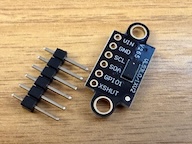
I chose VL53L0X. It is a Time-of-Flight (ToF) laser-ranging sensor that measures distance by timing how long light takes to bounce off an object. Unlike standard IR sensors that rely on reflected light intensity, this method is less affected by a target’s color or reflectance.
Connecting to Pi
Wiring the VL53L0X to a Raspberry Pi Zero W is straightforward as it uses the I2C interface. Connect the four main pins on the sensor to the corresponding pins on the Pi’s GPIO header:
| VL53L0X Pin | Raspberry Pi Pin (Physical) | Function |
|---|---|---|
| VIN | Pin 1 (3.3V) | Power |
| GND | Pin 6 (GND) | Ground |
| SCL | Pin 5 (SCL / GPIO 3) | I2C Clock |
| SDA | Pin 3 (SDA / GPIO 2) | I2C Data |
Ensure your connections are secure before powering on the Pi.
If your sensor breakout board has additional pins like XSHUT or GPIO1, you can leave them disconnected for a basic setup.
Enable I2C on Your Raspberry Pi
Since the VL53L0X communicates via the I2C protocol, you must enable I2C in the system configuration.
- Run the configuration tool:
sudo raspi-config - Navigate to Interface Options and enable I2C.
- Reboot your Raspberry Pi for the changes to take effect.
Set Up the Library
Install pip3
If you haven’t installed pip3 yet, run:
sudo apt update
sudo apt install python3-pip
Adafruit CircuitPython Library
Attempting to install the Adafruit CircuitPython library system-wide may result in an externally-managed-environment error:
error: externally-managed-environment

× This environment is externally managed
╰─> To install Python packages system-wide, try apt install
    python3-xyz, where xyz is the package you are trying to
    install.

    If you wish to install a non-Debian-packaged Python package,
    create a virtual environment using python3 -m venv path/to/venv.
To resolve this, create and use a virtual environment as recommended:
python3 -m venv adaenv
source adaenv/bin/activate
Now, install the Adafruit VL53L0X library:
pip3 install adafruit-circuitpython-vl53l0x
Python Script to Measure Distance
Create a test script named measure.py to verify the sensor is working.
measure.py
import time
import board
import busio
import adafruit_vl53l0x

# Initialize I2C bus using the Pi's default SCL and SDA pins
i2c = busio.I2C(board.SCL, board.SDA)

# Initialize the VL53L0X distance sensor
try:
    sensor = adafruit_vl53l0x.VL53L0X(i2c)
    print("VL53L0X sensor detected successfully!")
except ValueError:
    print("Error: Could not find the sensor. Check your I2C wiring.")
    exit()

# Optional: Increase timing budget for higher accuracy (default is 33ms)
# Increasing this can improve precision at the cost of slower updates.
sensor.measurement_timing_budget = 200000  # 200ms budget

print("Starting distance measurements. Press Ctrl+C to stop.\n")

try:
    while True:
        # Read distance in millimeters
        distance_mm = sensor.range

        # Convert to centimeters
        distance_cm = distance_mm / 10.0

        print(f"Distance: {distance_mm} mm ({distance_cm:.1f} cm)")

        # Wait 0.5 seconds before the next reading
        time.sleep(0.5)

except KeyboardInterrupt:
    print("\nMeasurement stopped by user.")
Test Run
Execute the script within your virtual environment:
python3 measure.py
Output:
VL53L0X sensor detected successfully!
Starting distance measurements. Press Ctrl+C to stop.

Distance: 323 mm (32.3 cm)
Distance: 321 mm (32.1 cm)
Distance: 325 mm (32.5 cm)
Distance: 326 mm (32.6 cm)
^C
Measurement stopped by user.
Update
While the VL53L0X provides more accurate measurements in a clear path, it ultimately proved unsuitable for my sump water level application. I had hoped its narrower beam would avoid internal obstacles, but it still picked up reflections from the water pump rather than the water surface.
I have since returned to using an ultrasonic sensor, but this time with a “stilling well” to stabilize and isolate the readings. An IR sensor would likely work with a stilling well as well; I chose the ultrasonic sensor simply because I happened to have a new Pi and sensor already set up in a nice enclosure. See my later post for more details.